
Instagram stories lets you post any photo or video that takes your fancy throughout the day and it will disappear 24 hours later.
Instagram is marching across Snapchat’s turf.
Stories is available for iOS and Android and will appear at the top of Instagram feeds. You’ll know when there’s something new to see, the profile photo will have a colourful ring around it.
To view someone’s story, you just tap on their profile photo. Their uploads will appear in a series and you can tap to go back or forward through their uploads at your own pace, or swipe to jump to another person’s story.
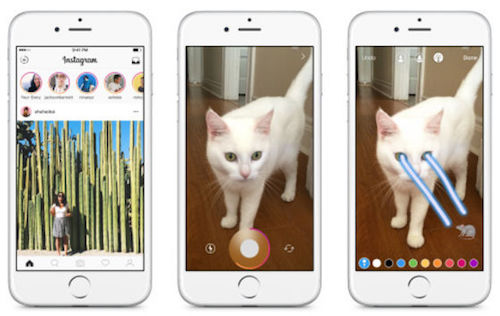
Videos are limited to 10 seconds, unlike the newly expanded length to 60 seconds for regular Instagram videos.
If you want to keep your story, open it and tap on the three dots on the bottom right of the photo or video. Then, tap Save Photo. Alternatively, tap Share as Post. Then, you can add filters, captions and locations if you like, before you tap Share.
You can choose who gets to see your stories and who doesn’t, using Hide My Story From in Story Settings. Whoever is barred will still be able to see posts and profile, but won’t see the story.
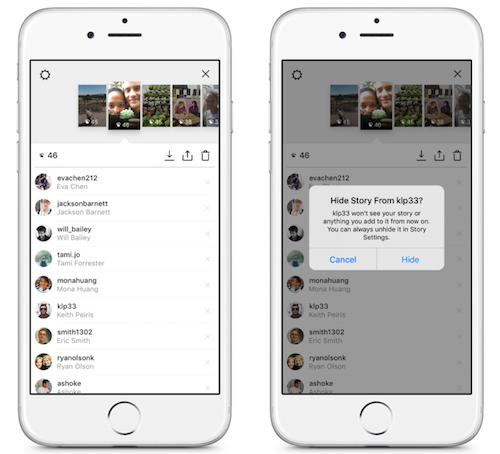
Haters can be barred from commenting. To prevent certain people from commenting, go to Story Settings and choose Everyone, which will let everyone comment on your story, People You Follow to let just those you follow comment or Off to prevent anyone from commenting on your story.
And your stories can be removed. You tap on the three dots at the bottom right of the photo or video you’d like to delete and then on Delete before you confirm.
You might also like